
With most businesses taking a hit right now it’s more important than ever to keep your operation secure. There have been many stories in the past few years of large companies dealing with the fallout of unsecure processes or systems. The Marriott data breach, Equifax and recent breach of the ARM industry company, American Medical Collection Agency (AMCA), show that no one is immune to cybersecurity issues if this not a top priority for the business.
Offices have been trending towards remote workers for years, but mostly as an exception or a special perk for proven staff. The current pandemic has forced most offices, like those in accounts receivable management, to increase the number of AR work from home staff, or risk shutting down their operations altogether.
While it can be done, moving staff outside of the controlled environment of a secure office does come with new challenges and risks, like maintaining payment security and compliance. If your AR agents are taking payments from their homes, you may be risking a data breach.
Payment Security Concerns for Remote Workers
Payment security should be a concern no matter where your staff operates, but there are extra factors to consider with remote workers accepting payments. If consideration isn’t put into how payments are coming in through the remote employees, your business may violate compliance rules or become victims of a data breach. Have conversations with each employee about the way they are planning to fulfill their work responsibilities. There are three main risk factors to keep in mind for remote teams.
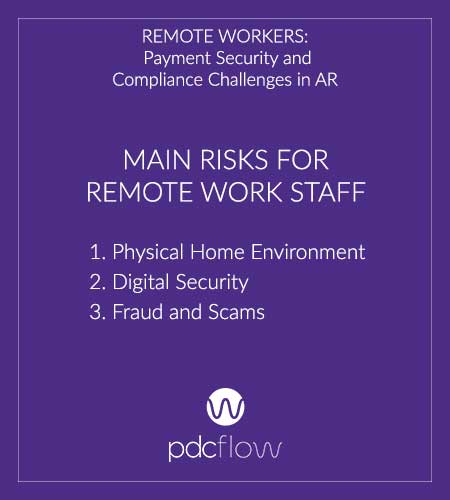
Physical Home Environment
When team members are working from home, it’s impossible to standardize their environment. AR work from home staff should have parameters for their home offices that ensure privacy and security for them, your company and your consumers. Ask:
- Is there privacy? If your employees are planning to operate in coworking spaces, this may violate compliance regulations. Working in the same room as a spouse, roommate or another individual outside of the organization should not be an option if consumer credit card data or personal information is discussed.
- Can others in the home see or access private data? Payment Card Industry (PCI) compliance requirements are intended to keep consumers safe while making payments. Even if your AR staff are not working in the same room as others they live with, they may pose a security risk and be in violation of PCI compliance regulations if home offices aren’t secure at all times. Computer screens should be locked when not in use and no sensitive information should be physically available on papers within the home.
- Can others hear phone calls? If employees are speaking about sensitive information with consumers, home offices should be private, so conversations can’t be overheard.
Digital Security
To reduce the risk of hackers gaining access to remote work systems, employees should be using secure networks to conduct business. In addition, be sure employees know not to use personal email addresses or personal cloud storage accounts to conduct work tasks. These types of systems are typically less secure and are at greater risk of being breached.
Fraud and Scams
Fraud and phishing are more difficult to fight with remote workers. Hopefully, businesses trust employees enough not to copy credit card numbers being read to them over the phone. However, that is a risk – one that increases when employees can not be monitored at home as they are in the office. An arguably greater threat is others within the home office doing so if the remote worker’s space is not private.
Scamming has become another security risk for work from home companies. Most of a company’s communications coming through email is a scammer’s dream. Fraudsters may pose as coworkers to send phishing or social engineering emails, asking for passwords or other private information.
Training employees to keep security in mind is obviously an important step when establishing a remote work team. Limiting the information workers have access to, however, is the ideal solution to prevent these situations from happening.
Preventing Data Breaches for Remote Workers
The simplest way to keep your company, employees and consumers secure is to limit the amount of sensitive information that is discussed or recorded between employees and consumers. Most payment systems offer self-cure payment options that don’t even require an employee to facilitate payments. Offering online payment and IVR phone systems consumers can use side-steps any of the payment security risks a remote workforce may present.
Self-Serve Payment Downsides
Offering the ability for consumers to make payments on their own is a necessity for AR business continuity and consumer convenience. However, there are some downsides. If you send a consumer to make a payment on their own, you are trusting your payment software is customer centric and trusting your consumers to follow through on payment.
It’s always in your best interest to ensure your AR agents can facilitate payments from start to finish to ensure they are followed through, so while self-serve options are a helpful tool, they are not a solution on their own.
FLOW Technology for Remote Work Payment Security
Being in contact with a live agent to discuss bills and understand payment options is the most likely scenario to secure payments. So how do you have the best of both worlds, keeping payment data secure while your team is working from home?
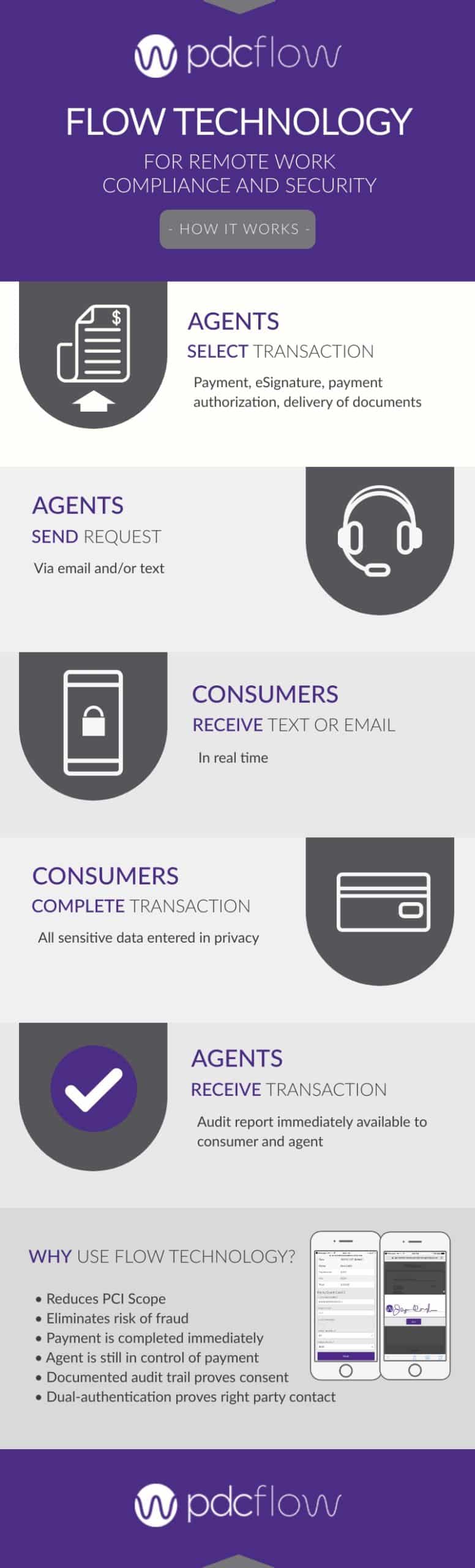
FLOW technology allows staff to send secure payment requests to consumers through an email address or text message. Consumers can sign documents, enter their own payment information and complete the transaction without the need to pass this sensitive data to your agents.
These FLOWs can be sent, accessed and completed within seconds, allowing agents to stay on the phone to ensure a secure, compliant, guaranteed payment – no matter where they are working.
For AR offices or departments that use web chats to interact with consumers, FLOW links can also be sent through chat to offer another channel for secure, guided payments.
To learn more about the features and benefits of using FLOW technology to take secure payments through your remote AR workforce, download our How-To guide:
Download FLOW Technology for Remote Work Compliance and Security How To:
- ABOUT THE AUTHOR -

Hannah Huerta, Marketing Specialist
Hannah Huerta is a Marketing Specialist at PDCflow. She creates content for the accounts receivable and payment industry.

Related Articles